The cybersecurity conversation for growing businesses breaks two ways. Some companies hear endless warnings about sophisticated attackers and zero-days and compliance frameworks that need their own consultants. Others decide they’re too small to matter and move on.
Small and mid-size businesses get hit hard. Attackers specifically target them because the defenses are simpler to break through. At the same time, you don’t need an enterprise security budget to stop most of what’s coming at you. The gap between “no real security” and “solid baseline” is smaller than vendors want you to believe.
This is about the fundamentals. What stops actual breaches. What we tell every client to do first.
What You’re Defending Against
Most successful attacks against growing businesses come from a short list.
Phishing and credential theft. An employee gets an email that looks real. Comes from a vendor. Comes from their bank. Comes from the CEO. They click a link, open an attachment, or hand over a password. That’s the entry point for ransomware. That’s how most of the expensive breach scenarios start.
Compromised credentials. An attacker gets a valid username and password. Could be from a data breach at some other company. Could be from phishing. Could be from brute force on a weak password. They log in. MFA stops this almost entirely.
Unpatched software. A vulnerability gets found. A patch gets released. If you don’t apply it, automated scanners find that gap in minutes. Attackers run those scanners. They’re not patient.
Ransomware. Your files get encrypted. Someone demands money to decrypt them. The business impact ranges from “get out the backups” to “company closing.” Almost entirely determined by whether you can recover.
Insider threats and configuration errors. Not every breach is someone attacking from outside. Misconfigured databases, excessive access permissions, careless data handling. These cause real damage.
The pattern across all of these: they exploit basic security failures. Not sophistication. The implication is straightforward: basic controls stop most incidents.
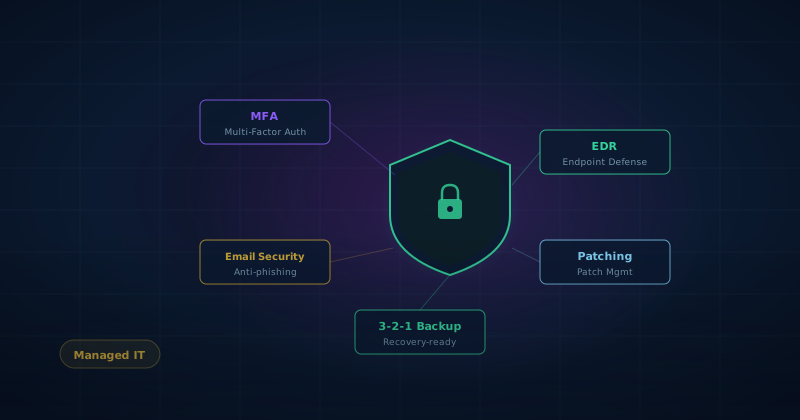
Five Controls That Work
Priority order matters. Here’s what actually prevents breaches.
1. Multi-Factor Authentication (MFA)
If you implement one security control, make it MFA on every account that supports it. Email. Remote access. Cloud services. Anything with sensitive data.
MFA means you need more than a password to log in. You need a code from an authenticator app or your phone. Most of the breaches we’ve helped clean up started with a compromised password on an account without MFA. Every single one was preventable.
Start with email. Email is where password resets flow through. It’s the master key. Then cloud platforms like Microsoft 365 or Google Workspace. Then VPN and remote access. Then everything else.
Authenticator apps like Google Authenticator or Microsoft Authenticator are more secure than SMS codes. SMS codes can be stolen through SIM-swapping attacks. For your most critical accounts, hardware tokens like YubiKey are the strongest option.
2. Endpoint Detection and Response (EDR)
Traditional antivirus looks for known malware signatures. Modern attacks bypass that. Fileless malware. Living-off-the-land techniques that abuse legitimate system tools. Ransomware variants that haven’t been catalogued yet.
Endpoint Detection and Response monitors what processes are actually doing. Flags suspicious behavior regardless of whether it matches a known attack pattern.
For smaller organizations, managed EDR is the difference between “we have EDR” and “EDR actually stops attacks.” A managed provider actively monitors alerts, investigates threats, and responds 24/7. That’s not something most teams can staff themselves. And it’s significantly more effective than deploying software that generates alerts no one has time to review.
3. Patch Management
Vulnerabilities get found and exploited constantly. The window between disclosure and active exploitation used to be weeks. Now it’s days. Sometimes hours.
An automated patch management system identifies, tests, and deploys patches on a defined schedule. No relying on individual employees to remember. No “we usually get to updates eventually.” Attackers scanning for unpatched systems don’t care about your intentions.
The technical controls that prevent most breaches are often the unglamorous ones. Patch management is at the top of that list. It’s also one of the most consistently neglected.
4. Email Security and Phishing Defense
Email is how most attacks arrive.
Filtering stops a lot of it. A good email security gateway catches known malicious attachments, suspicious links, and phishing attempts before they reach inboxes. Most modern email platforms include this by default at higher subscription tiers.
Authentication matters. SPF, DKIM, and DMARC records make it significantly harder for attackers to send email that appears to come from your domain. DMARC in enforcement mode also tells you who’s sending email on your behalf.
Technical controls reduce the volume of malicious emails. They don’t eliminate it. Training teaches employees what phishing looks like and what to do when something feels wrong. Simulated phishing exercises, where you send fake phishing emails and track who clicks, are among the most cost-effective security investments available. People learn fast when they see their own mistakes immediately.
5. Backup and Recovery
Every other control on this list prevents attacks. Backups let you recover when prevention fails.
An effective backup strategy follows the 3-2-1 rule: three copies of data, on two different media types, with one copy offsite or in immutable cloud storage. Critical detail: backups need to be isolated from production systems. Ransomware targets connected backup systems before triggering the main payload.
An untested backup is not a backup. It’s a hypothesis. You need to regularly recover data from your backups to verify the process actually works. Not once a year. Regularly.
The Human Side
Technology controls stop a lot. They don’t stop everything. A well-constructed phishing email that creates urgency, impersonates someone you trust, and lands when you’re distracted will get clicks despite good filtering. Social engineering attacks come by phone. Attackers impersonate IT support or executives requesting urgent wire transfers.
Two things matter on the human side.
Awareness. Employees who understand what attacks look like and how to verify suspicious requests are significantly harder targets. This isn’t about fear. It’s about making people alert.
Process controls. Financial processes especially. Wire transfer requests. New payee setup. Any payment change should require out-of-band verification. A phone call to a known number, not the one in the email. Business email compromise costs organizations hundreds of millions of dollars annually. It’s almost entirely preventable with process discipline.
Security as Behavior
Security culture is how people in your organization actually handle security day-to-day.
Organizations with strong security cultures have a few things in common. Leadership takes it seriously and models the behavior. Reporting potential incidents is encouraged without punishment so people actually learn from mistakes. Security is a shared responsibility, not something IT handles invisibly.
You don’t need a formal program to start building this. You need communication. Explain why security matters. Be transparent about the threats you face. Make it easy for anyone to ask a question or report something that seems off.
When You Need Outside Help
Most growing businesses don’t have the in-house expertise or bandwidth to manage all of this security work alongside everything else IT handles. A managed IT provider with genuine security capability can implement and maintain these controls as part of an ongoing service. The ongoing monitoring piece is particularly hard to do without dedicated resources.
If you handle regulated data or work with government clients or have specific compliance requirements, a formal security assessment and gap analysis is worth doing before building out the program. Start with clarity about where you are and where you need to be. It’s more efficient than discovering gaps after the fact.
Cybersecurity is not something you finish. It’s a posture you maintain and update as threats and your business change. The foundation doesn’t need to be complicated. The controls above address the majority of what most businesses actually face. Implementing them thoroughly is a more meaningful investment than any number of advanced tools layered on a weak foundation.
If you want to understand where your organization stands today and what matters most to tackle first, a security baseline assessment is a good starting point. We offer those as part of our managed IT engagements and as a standalone service.
TechRev Service
Managed IT Services
Proactive infrastructure management, security monitoring, patch management, and helpdesk support — we keep your technology running so your team stays focused on the mission.
See our managed IT servicesAI helped write this. Our team made sure it was worth reading.